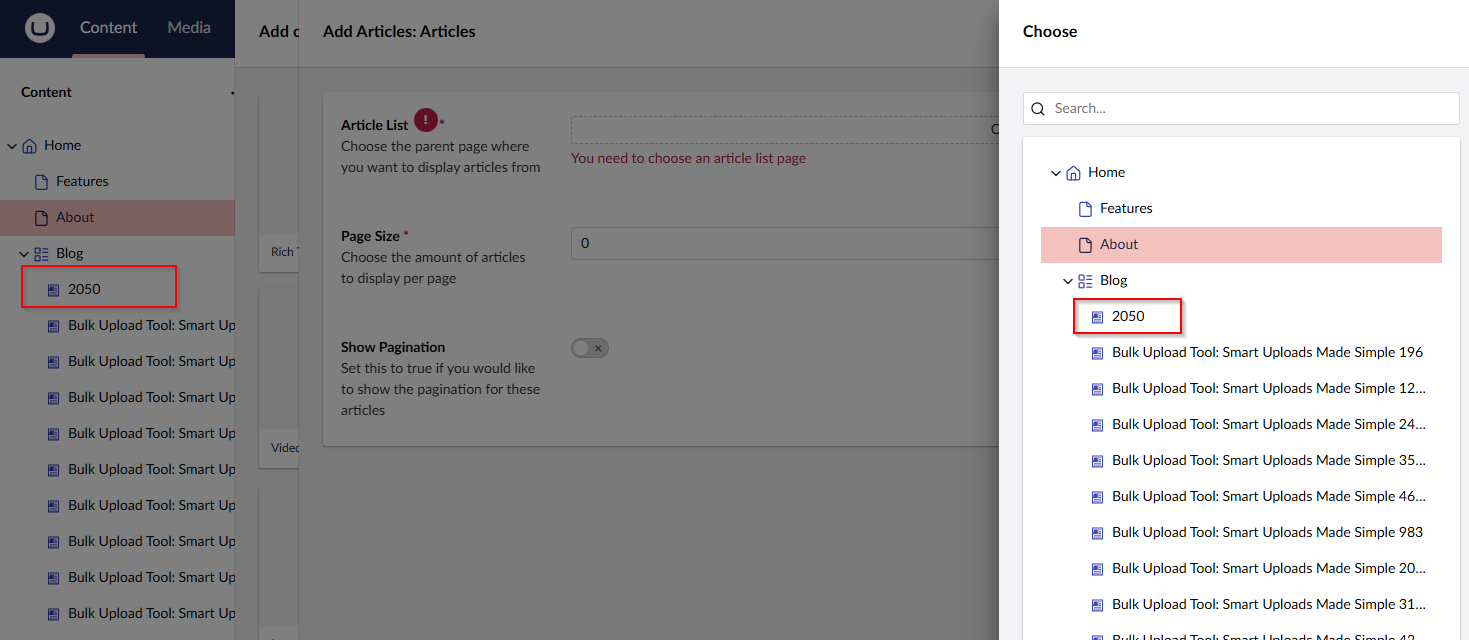
The other day, after an Umbraco 13 to Umbraco 17 upgrade, the team at Initials Labs were contacted from a client. They brought something to our attention that we werent aware of. This is the beauty of working with clients who have worked with Umbraco for so many years, they do things by instinct and sometimes, they do things you didn't even know was "a thing".
The issue they had was when they use a content picker within the backoffice to select a news article, they reported that they used to pick content that had recently been published. This article used to be at the top of the selection list. It was ordered by latest published first.
However, now that we had upgraded to Umbraco 17, they said this wasn't possible any more.
First reproduce the error
Since the clients site was already on Umbraco 17, I couldn't replicate the ordering that was in place in Umbraco 13. However, Paul Seal's Clean starter kit came to the rescue. I installed a clean version of Umbraco 13 with Clean Starter kit installed and I now had a working site, with content, that I could test on. It also already has a number of blogs setup with an Article Date picker property which was exactly the same way the client's site was setup.
The interesting thing was, I couldn't replicate the issue, or, more exact. I couldn't get the picker to be any different to how Umbraco 17 does it. So, it's not a bug after all, however, we still wanted to "fix" the issue for the client. They have hundreds of news articles and it would be nice to be able to make the user experience nicer for them.
They could use the content picker search bar, however, it's not always the same person picking the content from the picker as the person who wrote the article.
The solution
The first thing I did was check to see if this was a reported bug in Umbraco, it wasn't one that jumped out and I would have expected more people to be complaining about it. However, I did find 2 interesting issues that had been raised.
The first issue could be more what the client is saying is the issue, they cant jump to the last page of results any more because Pagination has been removed.
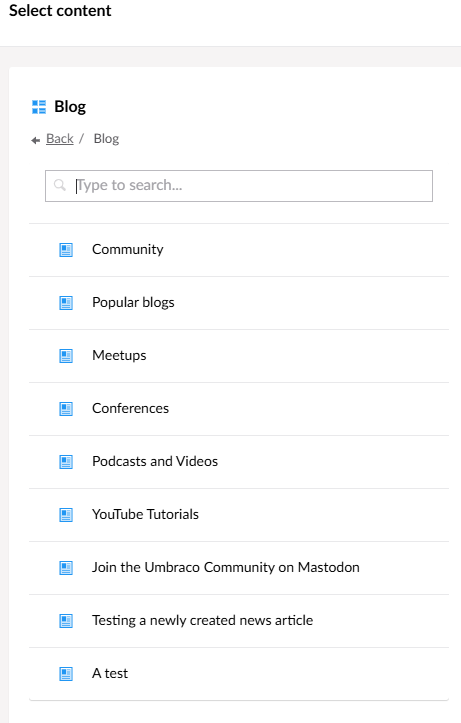
The second issue, is actually the first thing I tried. When I initial read the ticket reporting the issue, I thought I had a really quick fix, just sort the order of the children of the parent by created date or the custom News Date field. This does change the order within the list view, however, it does not change the order of the content tree, so the content picker still shows everything in the "wrong" order.
Content Picker Order
List View Order:
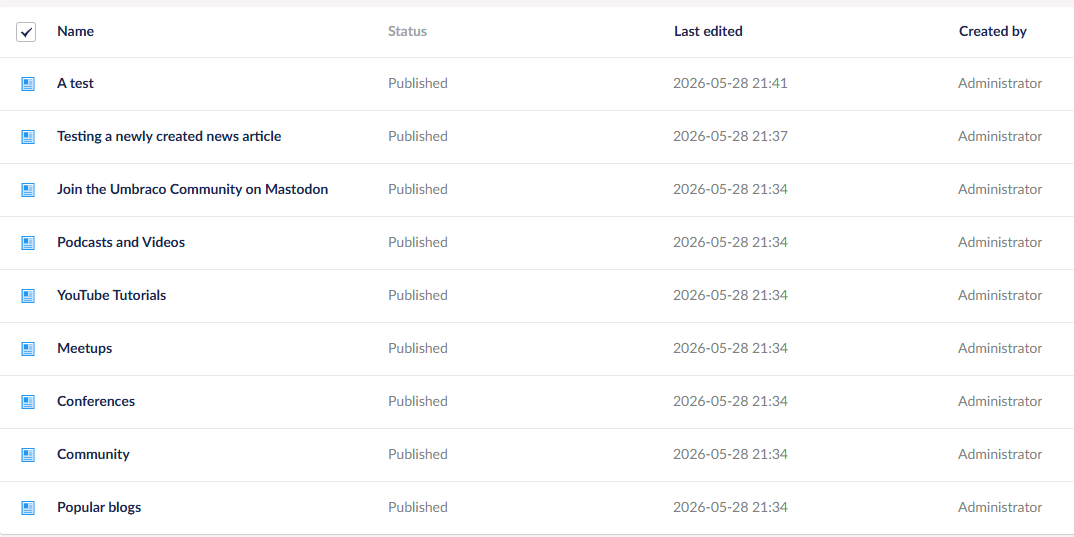
As you can see from the images, A test is at the top of the List View order, but at the bottom of the Content Picker view.
Without the option of adding the pagination back in to the content picker, I decided we could fix this view code.
Let's load up Visual Studio
After my experience with OC.PowerSort I knew I could manipulate the sort order programmatically. I decided to create a notification handler that would read the custom property "News Date" and then sort everything in Newest to Oldest order and update the Content Tree.
The Code
The notification handler looks like this :
using MySite.PublishedModels;
using Umbraco.Cms.Core.Events;
using Umbraco.Cms.Core.Models;
using Umbraco.Cms.Core.Notifications;
using Umbraco.Cms.Core.Services;

namespace MySite.Core.NotificationHandlers
{
    public class NewsItemSortHandler : INotificationAsyncHandler<ContentPublishedNotification>
    {
        private const int PageSize = 100;
        private const int RetryDelay = 500; // milliseconds

        private readonly IContentService _contentService;

        public NewsItemSortHandler(IContentService contentService)
        {
            _contentService = contentService;
        }


        public async Task HandleAsync(ContentPublishedNotification notification, CancellationToken cancellationToken)
        {
            var newsParentIds = notification.PublishedEntities
                .Where(e => e.ContentType.Alias == NewsItem.ModelTypeAlias && e.ParentId > 0)
                .Select(e => e.ParentId)
                .Distinct()
                .ToArray();

            foreach (var parentId in newsParentIds)
            {
                var capturedParentId = parentId;

                // Add a delay to ensure that the content is fully published before attempting to sort
                // This is a workaround for potential timing issues where the content might not be fully available immediately after publishing
                await Task.Delay(RetryDelay);
                await SortNewsChildren(capturedParentId);
            }
        }

        private async Task SortNewsChildren(int parentId)
        {
            var parent = _contentService.GetById(parentId);
            if (parent?.ContentType.Alias != News.ModelTypeAlias)
            {
                return;
            }

            var allChildren = FetchAllChildren(parentId);

            if (allChildren.Any() == false) return;

            // Check if already sorted to avoid unnecessary database updates
            bool alreadySorted = allChildren
                .Select((item, index) => item.SortOrder == index)
                .All(x => x);

            if (!alreadySorted)
            {
                _contentService.Sort(allChildren);
            }
        }

        private IEnumerable<IContent> FetchAllChildren(int parentId)
        {
            var allChildren = new List<IContent>();
            var page = 0;
            long total;

            do
            {
                var children = _contentService.GetPagedChildren(parentId, page, PageSize, out total,
                    ordering: new Ordering(orderBy: "newsDate", isCustomField: true, direction: Umbraco.Cms.Core.Direction.Descending));

                allChildren.AddRange(children);
                page++;
            }
            while (allChildren.Count < total);

            return allChildren;
        }


    }
}
To make it work, you need to register it in a composer. This can be a file anywhere in your project that inherits from IComposer
 public class NotificationComposer : IComposer
 {
    public void Compose(IUmbracoBuilder builder)
    {
       builder.AddNotificationAsyncHandler<ContentPublishedNotification, NewsItemSortHandler>();
	}
 }
Umbraco will Automagically find this file and register your Handler.
Things to note
Some interesting things in the notification handler are, I needed to add a small delay in executing the task as I was getting write locks for some reason. I also had to add paging to my sorted list as I was getting other thread issues.
Because this only runs when the articles has been published, if you change the date and then republish it, it doesn't update the content tree, you need to unpublish and republish the article. This was a decision I made so that this notification handler doesn't run every time someone makes an edit to an article.
The content tree doesn't refresh automatically, to see the changes, you need to reload the content tree manually.
If setting this up on an existing project that maybe has 100s of nodes, on the initial save, it will take time for the sort to complete. There is paging setup to help with this but it will take a bit of time. After the initial sort is done, publishing more articles should be quicker.
The result
Now with this all hooked up. When I add a new News Article with a date, it will be sorted in to the correct order and it will also show correctly in the Content Picker.