Umbraco.Automate Connection
I was in Copenhagen last week for the Umbraco MVP Summit and Codegarden. Normally I would come home and write a wrap-up blog covering the whole week, but this year is different. Something came out of it that I wanted to write about straight away.
At the MVP Summit we got a sneak peek at a new product from Umbraco HQ called Umbraco.Automate. It was officially announced in the keynote on the first day of Codegarden.
Umbraco Automate is an event-driven automation engine built into the Umbraco backoffice. Build workflows with triggers and actions, no external platforms required.
As soon as I saw the demo, I knew exactly what I wanted to build. Posting a new blog and then having to manually share it to Mastodon, BlueSky and LinkedIn is a pain. Every time. I got home on Friday evening, opened my laptop, and started building.
OC.Automate
My first thought was to submit a PR to the Umbraco.Automate GitHub repo and add a Mastodon connection. Matt Brailsford suggested I create my own package instead. So I did.
The result is OC.Automate.Mastodon, which might be the first third-party package for Umbraco.Automate. I am not usually someone who gets in early on these things, but I was too excited to sit on it. Umbraco.Automate is still in beta, and I could not resist anyway.
The plan is to build this out into a full suite of connections, all living under the OC.Automate repo.
Setting Up OC.Automate.Mastodon
The way I have set up the Mastodon connection means you can, theoretically, post to more than one Mastodon account through a single workflow. Each account just needs its own access token in appsettings.json:
"OwainCodes": {
  "Automate": {
    "Mastodon": {
      "AccessTokens": {
        "OwainCodes": "8EEv1qS0qH_aTJSNUlU",
        "OwainCoffee": "s2kljfkld2_skdlj23lk"
      }
    }
  }
}
Then inside the workflow, you just pick which account you want to post from:
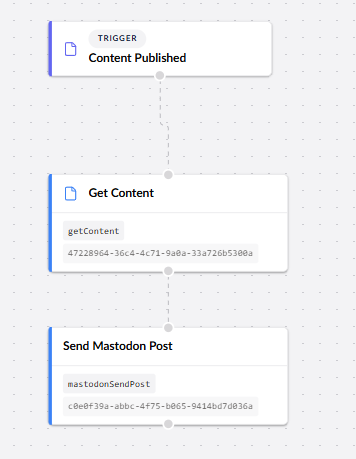
In this example, when I publish a Blog Page the workflow grabs the content so that the Send Mastodon Post action can pull the title and URL. It then posts to Mastodon automatically with a link back to the blog post.
From there I can chain other actions on top. Posting a notification to Slack, for instance. BlueSky and LinkedIn are on the list too.
The fact that Umbraco.Automate is open source and completely free makes all of this even better. I have a lot of ideas for where this can go.
If you want to help improve the Mastodon integration or get involved with anything else I am planning to build, contributions are very welcome.
Try It Out
You need Umbraco 17.4 or higher with Umbraco.Automate installed, then install OC.Automate.Mastodon via NuGet. Once installed, a Mastodon connection will be available to use in your workflows.
If you run into anything, feel free to raise an issue on GitHub.