I built a pixel art office full of Claude agents, and I only talk to the manager
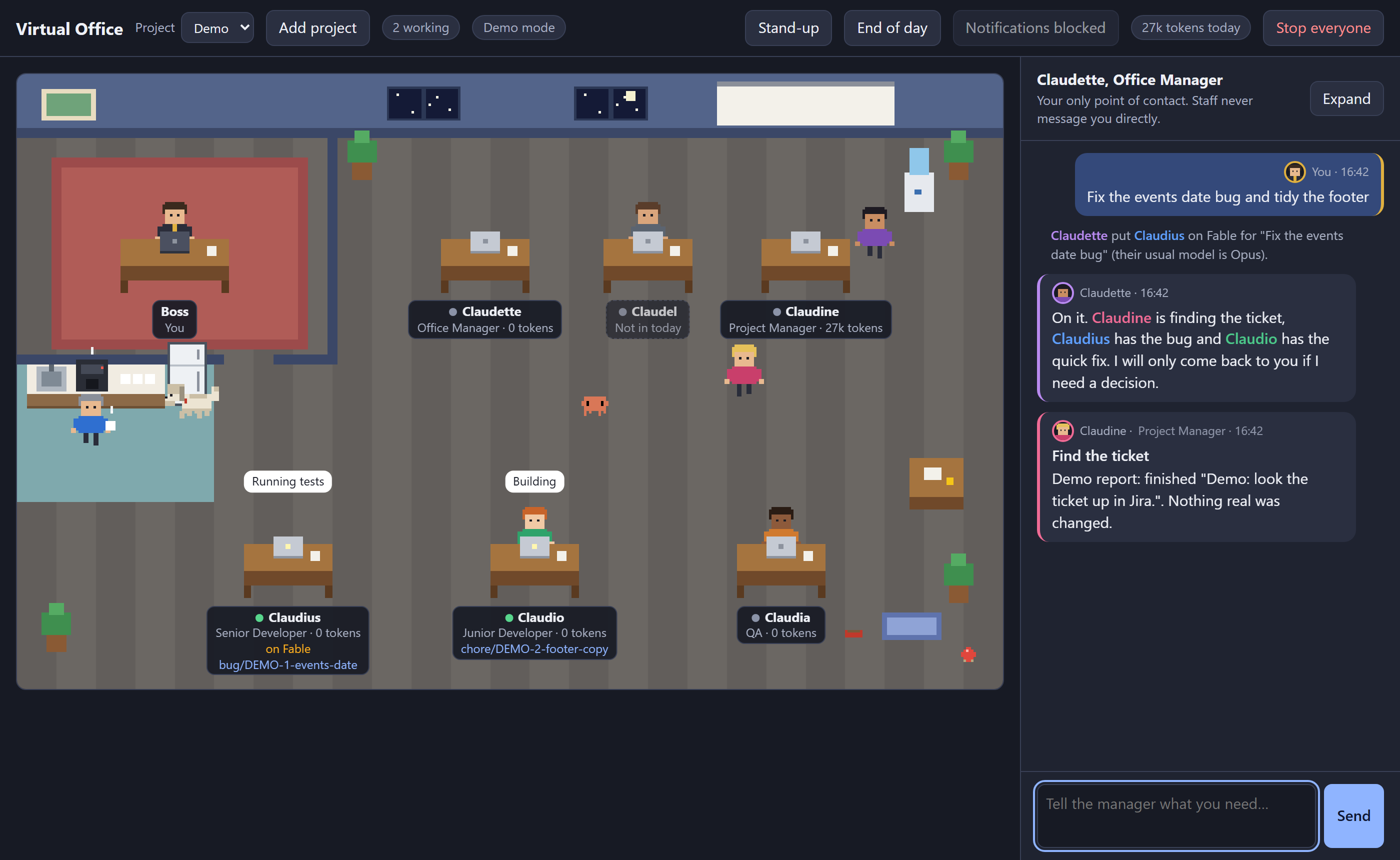
TL;DR. Virtual Office is a small local app that runs a team of Claude Code agents on a git repository and shows them working in a pixel art office. There's a manager, two developers, a QA, a project manager and a contractor who only turns up to review pull requests. I only ever talk to the manager. She hands the work out, the team gets on with it in their own git worktrees, and I'm only pulled in when a decision is genuinely mine. It's open source, it's free, and it's about ten minutes from clone to a working office. The link is at the bottom.
This setup could be super useful for anyone that finds swapping between terminal tabs and sessions really overwhelming. The past week I've been using this office and I've found it much easier to organise everything and I've felt less fatigue from context switching all the time.
Contents
- Why on earth did I build this?
- Meet the team
- How it actually works
- Worktrees, so nobody trips over anyone
- Who said what
- The guard rails
- Pull request reviews by a contractor
- Choosing the model per task
- Tokens, not money
- Talking to one agent directly
- The silly bits
- Things that bit me
- What it doesn't do
- Run your own
Why on earth did I build this?
I'd got into the habit of running a few Claude Code sessions at the same time. It's brilliant, but it turns you into a switchboard operator. Which terminal is doing what? Who's waiting on me? Did that one finish, or is it sat there asking a question I haven't seen?
What I actually wanted was to behave like a manager. Say what I need, once, to one person, and have them sort the rest. And I wanted to see it. A wall of terminal tabs tells you nothing at a glance. A little office where somebody is visibly typing and somebody else is waiting at the meeting table tells you everything in about a second.
So I built one. Yes, it's partly a toy. No, I'm not sorry.
Also a special shout out to Suzanne Aitchison for giving me this idea. We were chatting about how we work with agent, how we find it mentally taxing and she mentioned that her work have a virtual office for co-workers but also that she handles her agents in a similar way - speak to a manager and they look after it all. I just merged the two ideas together.
Meet the team
Everyone is a real Claude agent, using the Claude Agent SDK. They each have a name, a role, a usual model and a desk.
| Desk | Name | Model | What they do |
|---|---|---|---|
| Manager | Claudette | Opus | Takes my requests, delegates, and only asks me when a decision is mine |
| Senior developer | Claudius | Opus | The demanding stuff that needs proper reasoning |
| Junior developer | Claudio | Haiku | Easy, quick wins |
| QA | Claudia | Sonnet | Tests the developers' work. Can't edit files |
| Project manager | Claudine | Sonnet | Lives in Jira. Can't edit files or run commands |
| Hot desk | Claudel | Opus | A contractor who only comes in to review pull requests. Read only |
The names are all in a config file, so you can rename everyone. Mine are very much working titles.
The important rule is this one: staff never message me directly. Only the manager does. Everything comes back to her, and she decides what's worth bothering me with.
How it actually works
The app is a small Node server (Express and a websocket) that serves a canvas drawing of the office and talks to the Agent SDK. It only listens on 127.0.0.1, and it rejects websocket connections from any other origin, because it can direct agents on your machine and I'd rather nobody else could.
When I type in the chat, the message goes to the manager. She's an agent with a very limited set of tools. She can read files, but she can't edit anything or run commands. What she can do is call a handful of tools I give her:
assign_taskgives a task to a member of staff, with a title for the office floor, full self-contained instructions, and optionally a branch and a modelstop_agentstops somebody mid-taskask_ownerputs a question card in front of me with answer buttonstell_ownersends me a short noteoffice_statustells her who's doing what
assign_task returns straight away. The agent goes off and works, and when they finish, their report arrives back to the manager as a message. She reads it, decides what happens next, and either assigns the next piece of work or tells me it's done. I don't have to be involved in any of that plumbing.
Every agent is a proper Claude Code session in the project folder, so the repo's own CLAUDE.md, rules and MCP servers all apply to them. That's the bit I like most. The office isn't a clever imitation of my setup. It is my setup, with a manager on the front.
Worktrees, so nobody trips over anyone
If both developers edit the same folder at the same time, you'll have a bad afternoon. So when the manager gives a task a branch, the office creates a git worktree for it and the agent works there.
A new branch starts from the remote's default branch after a fetch, or from HEAD if there's no remote. The office also adds .claude/worktrees/ to .git/info/exclude if your project doesn't already ignore it, which is local only and never committed. When the work's merged or abandoned, the manager removes the worktree. Git refuses it if it has uncommitted changes, and the branch is always kept.
There's also a rule that two people never share a folder while one of them is changing code. QA gets sent to the developer's branch after the developer reports in, not while they're still typing.
Who said what
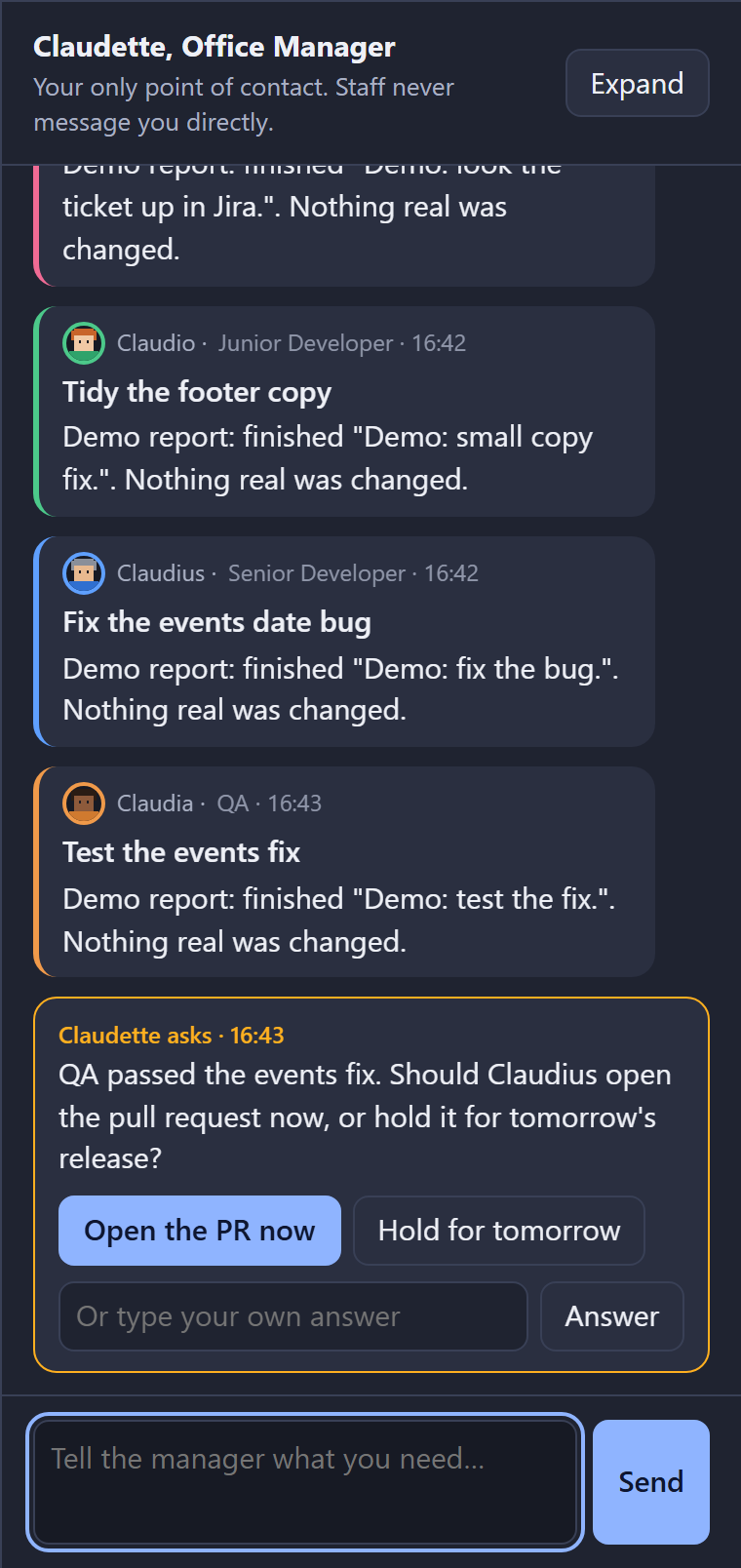
This one came from using it. Staff report back to Claudette, not to me, and for a while those reports were invisible. The only way I knew who had said what was if Claudette happened to name them in her reply, and when she summarised three reports in one message I couldn't tell which agent had said which part.
So now every report shows up in the chat as its own card, with the agent's face, name, role, the task title and the first line of what they said. If there's more, you click the card to read the rest. Claudette's reply lands after the reports, so the order reads the way it happened.
Everyone also has a colour, taken from their shirt on the office floor. It's a stripe down the side of their cards, and the little face is drawn from the same pixel art as the figure at the desk. Names in Claudette's messages are tinted to match, so "Claudius is on the bug" is easy to scan. I made sure the name and role always sit next to the face, so you never have to rely on colour alone.
The guard rails
Giving a team of AI agents the run of your repo deserves some respect. Every single tool call goes through a PreToolUse hook, and the hook enforces three things:
- Role limits. QA can't edit files. The project manager can't edit or run commands. The reviewer can't change anything. The manager can't run tools directly at all.
- Always blocked. A list of patterns that are refused outright: force pushes, hard resets, recursive deletes, that sort of thing.
- Needs my approval. Pushes, pull request creation or merging, and releases pause until I click Approve or Decline.
That last one used to bother me. Early on, an approval looked like this:
PowerShell: git add -A; git commit -m "..."; git push origin feat/x; gh pr view 12 --json ...; python -c "..."
That isn't a question a human can answer. So approvals are now cards. There's a plain English headline, a list of the steps with the ones that need my say-so flagged, and the exact command tucked away in a collapsible block for when I want to check it. It recognises the common git and gh shapes, and when it doesn't understand something it says so, rather than pretending.
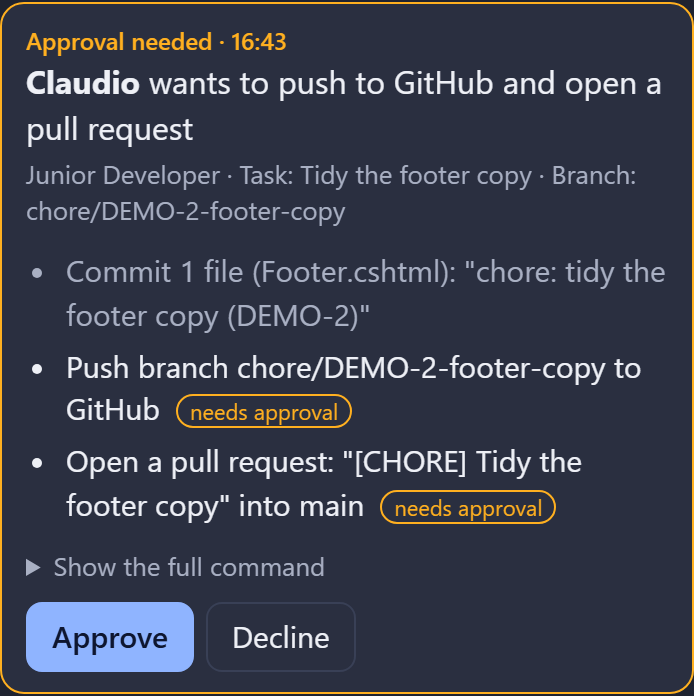
It's a safety net, not a sandbox. Please read the cards before you click Approve.
Pull request reviews by a contractor
I didn't want the person who wrote the code marking their own homework, and I didn't want to make Claudius or Claudia do reviews on top of everything else. So I brought in a contractor.
When a pull request is open, Claudel beams in, arrives at the hot desk, reviews it, and leaves. He starts completely cold every time, a fresh conversation with no memory of how the work was done, which is exactly what you want from a reviewer.
He can read files, read the pull request and run tests. He can't edit, commit, push, or post anything to GitHub with gh. His one way to write is a draft review, a GitHub pending review that only my signed-in account can see until I open the pull request, read it and submit it myself (or throw it away). Nothing is published without me.
Choosing the model per task
Everyone has a usual model, but the manager can change it for a single task. If Claudius is on something properly gnarly, she can put him on Fable for that task. Routine work can go down to Haiku. When the task ends, they go back to their usual model.
It's a model option on assign_task, limited to a list in the config, and each model has a one line "use it for" description that she reads when deciding. She's told to treat the most capable model as something to use sparingly, and she doesn't ask me first. It shows on the floor (the name tag says "on Fable" for the length of the task) and in the chat, so I never wonder why something's using more than it should.
If the chosen model isn't available on your account, the agent just carries on with their usual one and says so in the chat. I'd rather it degraded than died.
Tokens, not money
I originally showed a dollar figure per agent. Then I remembered that on a plan, it isn't real money, so the number was just noise. It's now tokens: new input, output and cache writes, per agent and per model, per day. I don't count cache reads, because re-reading cached text would swamp everything else and tell you nothing useful.
It's a guide to how fast you're getting through your plan limits. It is not a bill. The header shows the day's total, and hovering gives you the split by model.
Talking to one agent directly
The manager is my only point of contact, but sometimes I want to go round her. Click any agent's name tag to open their log, and there's a box at the bottom that talks straight to them.
- A normal message goes into their existing conversation
/clearforgets it/model sonnetchanges their usual model until the office restarts/stopstops them/pluginslists plugins loaded just for them- Any other
/commandis passed to their own Claude Code session, so/compactor a skill's name should work
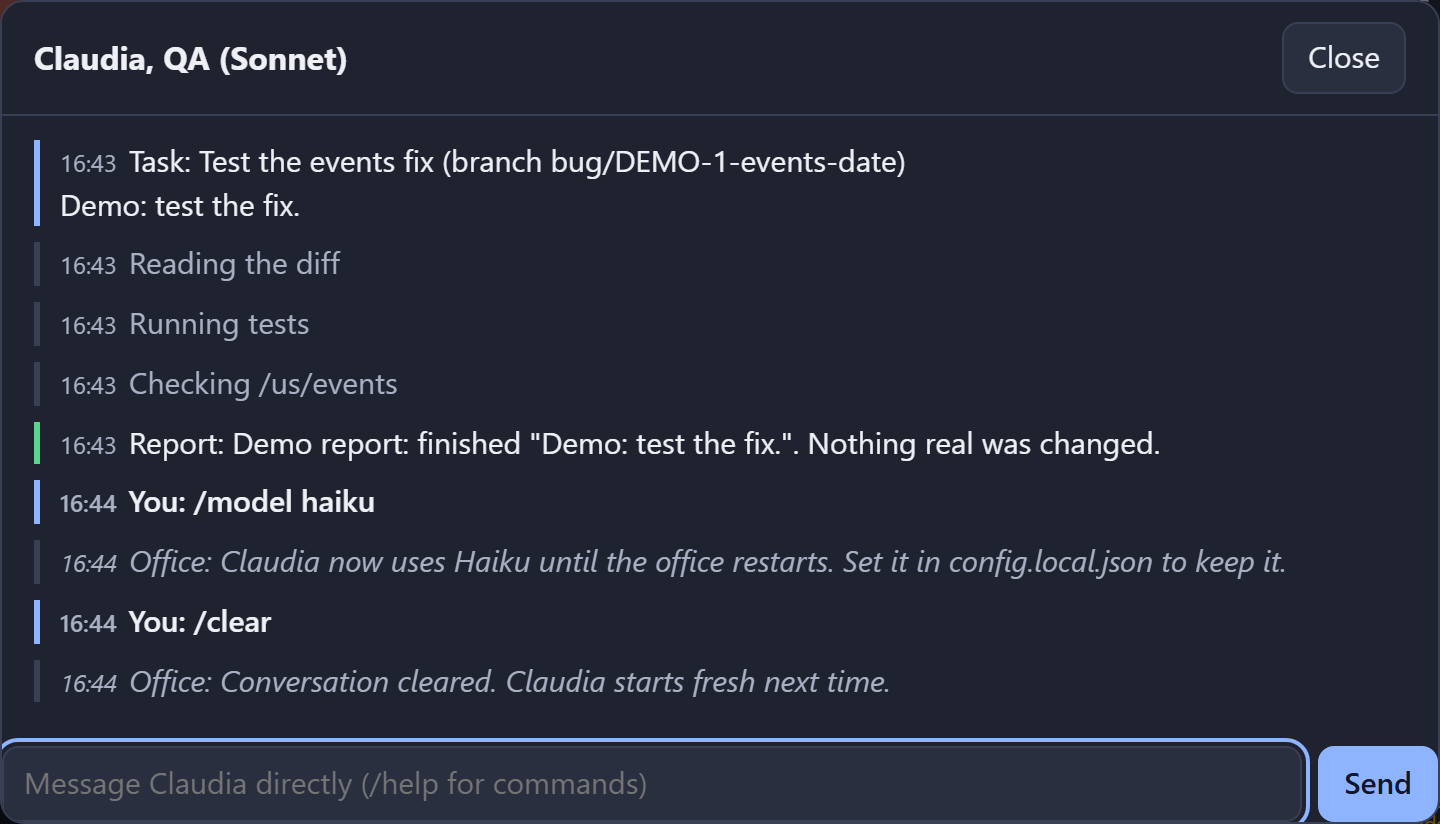
You can also give one agent their own plugins. List local plugin folders under that agent in your config and they load for that agent only. When I talk to an agent directly, the manager gets a quiet note that I did, so she isn't surprised by work she didn't assign.
The silly bits
Because it's my office and I make the rules:
- There's an office dog, a big shaggy cream Romanian Mioritic Shepherd with a fringe over its eyes, styled on my own dog Toby, and it has a ball. Click the ball and it throws it for the dog. The first version of the dog was beige on a beige floor and vanished completely, so the floor is now a darker grey and the dog now stands out.
- There's a little pet Claude, drawn as the orange pixel mascot, who wanders around.
- Click the water cooler and it spills. The pet Claude turns up with a mop and cleans it up.
- When Claudel arrives or leaves, he beams in and out like a transporter. If he's got nothing on, click a plant and he'll drop in for thirty seconds anyway.
- My laptop has a dark lid. Everyone else's is light grey. That's the only special treatment I get.
- A laptop lid goes red when that agent's latest test run is failing, and shows a green light when it passes.
- When a pull request is merged, confetti falls and the dog gets the zoomies.
- The windows follow your clock and the time of year, so there's daylight, golden dusk and stars at night. Sunrise and sunset come from the date and a
latitudein the config (51.5 by default, which is London), so a winter afternoon in the UK is dark by about four. - Staff pop to the kitchen for a coffee now and then, and everyone gathers at the meeting table for stand-up.
Here's Claudel mid-teleport, then the spill and the mop:


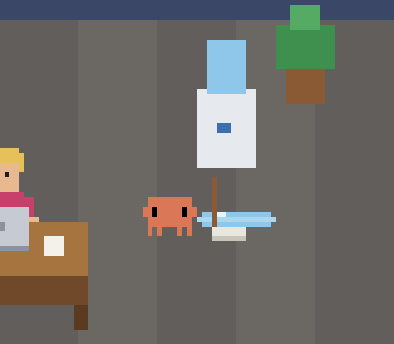
All of it is decoration, and it's switched off if your system asks for reduced motion.
There are also two buttons in the header. Stand-up has the project manager triage the Jira board and the manager post the plan for the day. End of day has her post what got finished, what's in progress and what's waiting on me. You can put them on a timer too, but they're off by default because they spend tokens without being asked.
Things that caught me out
It didn't work first time. Obviously.
- Stopping an agent was slow. My first "stop Claudius" went through the manager, which meant waiting for her current turn to finish and then for a model reply. Now a plain "stop Claudius" is handled by the office at once, and each turn has its own
AbortController, raced against the session so a stop is instant even if the session is slow to wind down. - A stale abort signal. Because the controller is per turn, you have to create a new one at the start of each turn, or a later task inherits the old, already aborted one and stops before it starts. That one took me a while.
- The windows were wrong for half the year. I'd hard-coded night as 8pm to 6am. It's 4:30pm in the UK in late November and properly dark, and my office was cheerfully sunny. The window colours now come from the day of the year and your latitude, with a rough equation of time and your clock's daylight saving shift thrown in. It's close enough for a window, and it gets the November gloom right.
- A phantom black dot. An unknown agent in an older saved state drew a name tag with nothing in it under Claudel's desk. If the server doesn't know the agent, the tag and desk are now hidden.
- Running it from inside a Claude session can upset the sign-in. Run it from your own terminal so the agents use your normal Claude Code login.
What it doesn't do
- Worktrees separate files. Tasks that change the same shared thing, like a database schema or generated files, can still collide. The manager is told to run those one after another, but nothing enforces it.
- Each person does one task at a time.
- It doesn't sandbox anything. The agents run real commands in your real project folder.
- An approval that's pending when the app closes expires, and the agent has to be asked again.
- I've mostly tested it on Windows. It's plain Node, so it should be fine elsewhere, but I haven't tried macOS or Linux yet.
Run your own
You'll need Node 20 or newer, Claude Code installed and signed in, and git. The GitHub CLI (gh) is only needed for pull request work and the contractor's draft reviews, and you'll want a git repository for the team to work on.
git clone https://github.com/OwainWilliams/virtual-office.git
cd virtual-office
npm install
npm start
Open http://localhost:4700. The first time, the office asks for a project: a name, the full path to a git repo, and optionally a Jira key. That's it.
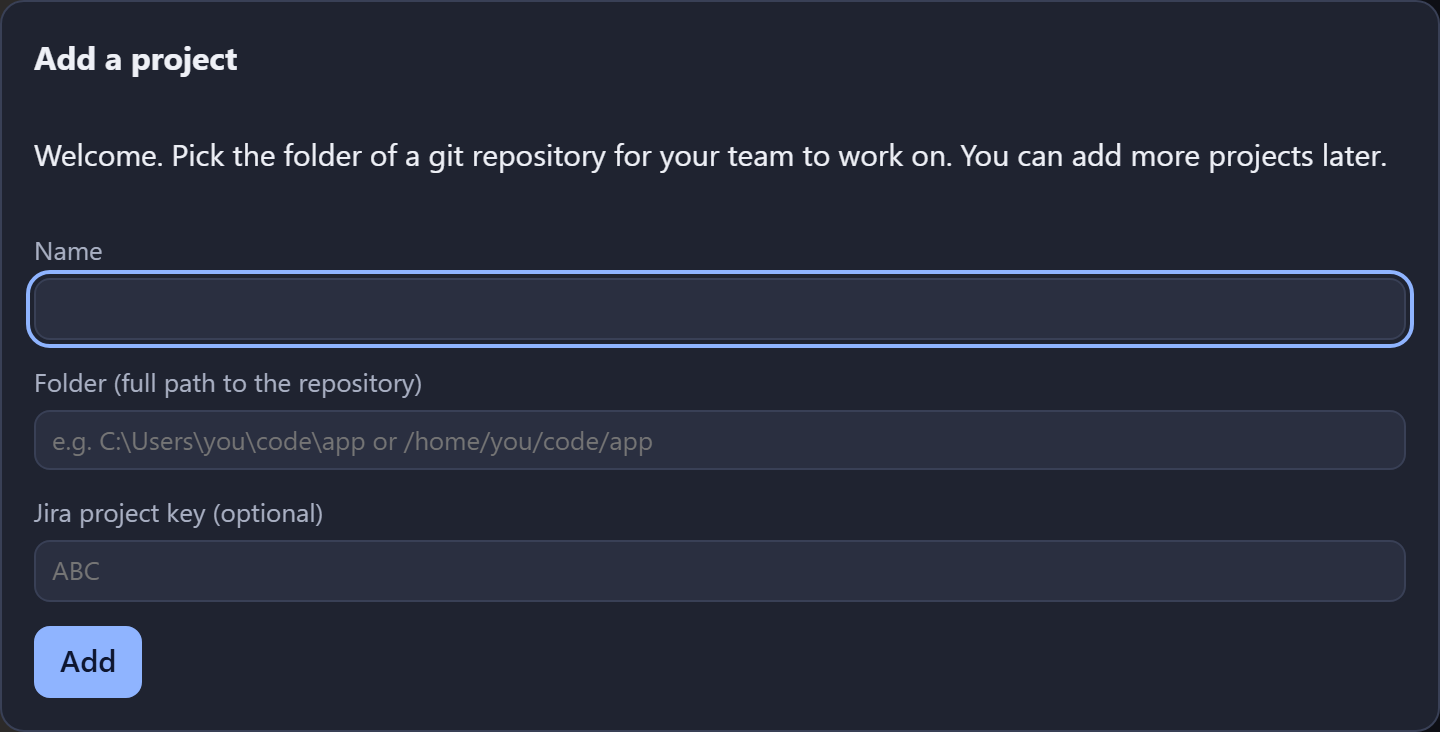
Want to look around without spending any tokens? Start it in demo mode and the agents are fakes:
$env:OFFICE_DEMO = '1'; npm start
Your own settings go in a config.local.json next to the shipped config.json, which wins over the defaults and isn't committed. You only list what you change:
{
  "officeName": "Acme HQ",
  "ownerName": "Sam",
  "latitude": 40.7,
  "agents": { "senior": { "name": "Ada", "model": "sonnet" } },
  "routines": { "standupTime": "09:00" }
}
The code is here: github.com/OwainWilliams/virtual-office. It's MIT licensed, so take it, rename everyone, and make the dog yours.
To make changes to it, I point Claude Code at my local repo and prompt the changes, this is very much still a work in progress and there are loads more things I want to enable it to do, but I thought I'd share an early working example.
If you build something fun on top of it, I'd love to see it or even better, make a PR to the repo and then we can all enjoy it.