Initials.AutoLink, our first open source package
Initials.AutoLink turns keyword mentions in your content into links, at render time, with no editor action at all. It's for Umbraco 17+ on .NET 10, it's MIT licensed, and it's the first package Initials Labs has open sourced.
Where it came from
A client asked us a fun question. Could we autolink keywords in their content to other articles, or out to external sites, all managed from the CMS? They publish a lot, they mention the same handful of products constantly, and going back through years of articles to add links by hand was never going to happen.
We gave the honest answer: let us build a proof of concept and come back to you.
The PoC worked. Then it kept growing, because every demo threw up another sensible question that turned into a feature. Plurals. Synonyms. External links. What happens when you delete the page a keyword points at. Somewhere in that pile it stopped being a spike in a branch and became a package.
What it does
Add a keyword in the Autolink section, point it at a destination, done.
The keyword is a phrase like Umbraco Automate. The destination is a page on your site or an address anywhere else, like the Umbraco Automate repo or its docs. Two fields. No document type changes, no template changes, no properties to add.
From then on, anywhere that phrase appears in rich text or Markdown, it renders as a link. An editor writes "we tested this with Umbraco Automate last week" and that phrase becomes a link.
The editor did nothing. They just wrote the sentence.
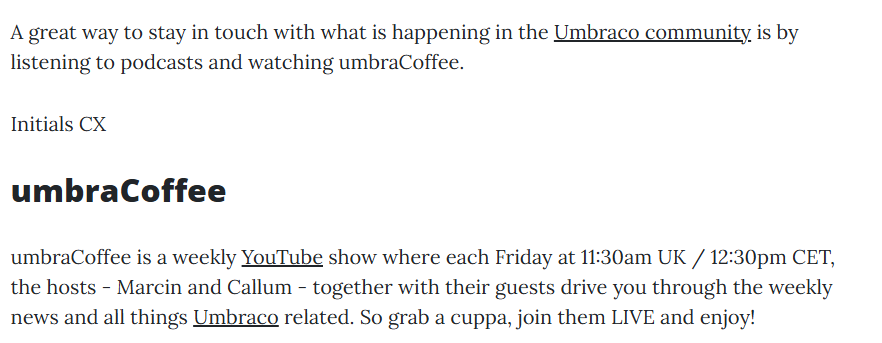
Three keywords on one page there. Umbraco community goes to community.umbraco.com, YouTube goes to a page on the same site, and Umbraco picks up its first standalone mention further down. Note the umbraCoffee heading is left alone, even though it contains the word umbraco, and that Umbraco community beat Umbraco to the same words.
Let's go back to the future
It works backwards in time.
Write the sentence today, add the keyword in six months, and every old article that mentions the phrase links to it the next time somebody loads the page. No edits, no republishing, no spreadsheet of pages to go and fix.
Forwards too. Add the keyword before the target page even exists and the links switch themselves on the moment it goes live.
The one decision everything hangs off
Links are added when a page is served, not when it's saved.
Publish time sounds tidy. Find the keywords, insert the links, store the result, done once. But then the links are frozen at whatever the keywords were the day the editor pressed publish. New keywords never reach old articles unless you republish everything. Deleting a target page leaves dead links in the database forever. And editors open their own content, find anchor tags they never typed, and helpfully delete them.
Render time means the stored content is never touched. Links are worked out fresh every time the page goes out, so they can't go stale, they can't be orphaned, there's nothing to clean up, and the editor's content stays exactly as they wrote it.
There was a selfish reason too. I run packages that post to Mastodon, Bluesky and LinkedIn when I publish. A publish time approach would have meant republishing a couple of dozen posts to backfill one keyword, which is several hundred social posts from a single change. If a feature needs a kill switch to stop it spamming everyone you know, it's in the wrong place.
Where it works, which is everywhere
A value converter is the step that turns a stored property value into what your templates receive. For rich text that's markup to HTML. For Markdown it's markdown to HTML.
Both land in the same place, so the package wraps both. One shared wrapper does the work, with two thin converters over it, one on Umbraco's rich text converter and one on its Markdown editor converter. Umbraco's converter does its normal job, mine takes the HTML on the way past, adds the links, and hands it on. Everything else delegates straight through.
So your Markdown properties autolink exactly like your rich text ones, and the markdown in your database is still just markdown. The linker never sees it. It only ever sees the HTML that came out the other end.
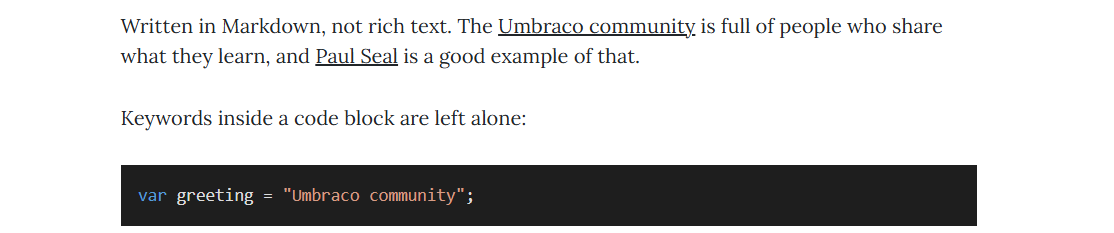
That's a Markdown property, not rich text. Two keywords linked in the prose, and the same keyword sat in a code block completely untouched.
Working at that layer buys coverage. Rich text and Markdown inside a Block List, a Block Grid, or blocks inside blocks all convert through the same path, so the linker works in all of them with no changes to your views. No partial to swap, no tag helper to remember, nothing sprinkled through your templates.
One caveat: the Delivery API output passes through untouched. This is a rendered page feature, not a headless one.
Links that look like a human made them
Getting links in is the easy half. Getting them in without making the page look like a link farm is the interesting half.
The HTML is parsed, not string replaced. Run a find and replace over raw HTML and you'll rewrite a keyword sitting inside an href and break it, or nest an anchor inside an anchor somebody made by hand. So the markup is parsed properly with AngleSharp and only the real text nodes get touched.
Then the rules:
- Only the first mention on a page gets linked. The same phrase linked five times looks like spam.
- A page never links to itself.
- The editor's casing is preserved, so
umbraco automatestays lowercase. - Word boundaries are respected, so a keyword can't reach into the middle of a longer word.
- Longest keyword wins, so
Umbraco AutomatebeatsUmbraco. - Anything inside an
<a>,<code>,<pre>or a heading is left alone, so your fenced code blocks are safe. - If an editor already linked that phrase to that destination by hand, the package stays out of the way.
Every link it creates carries data-autolink="true". External ones also get data-autolink-external="true" and rel="nofollow". Small detail, big payoff: you can always tell the package's links from the editor's, style them differently, or hide the lot with one CSS rule. Nothing is baked into your content, so there's nothing to undo.
One screen, one source of truth
Keywords live in a custom Autolink section. One screen showing every keyword, where it points, and which pages mention it. Add a keyword, change its destination, toggle a link off, all in the same place. You grant the section through User Groups like any other.
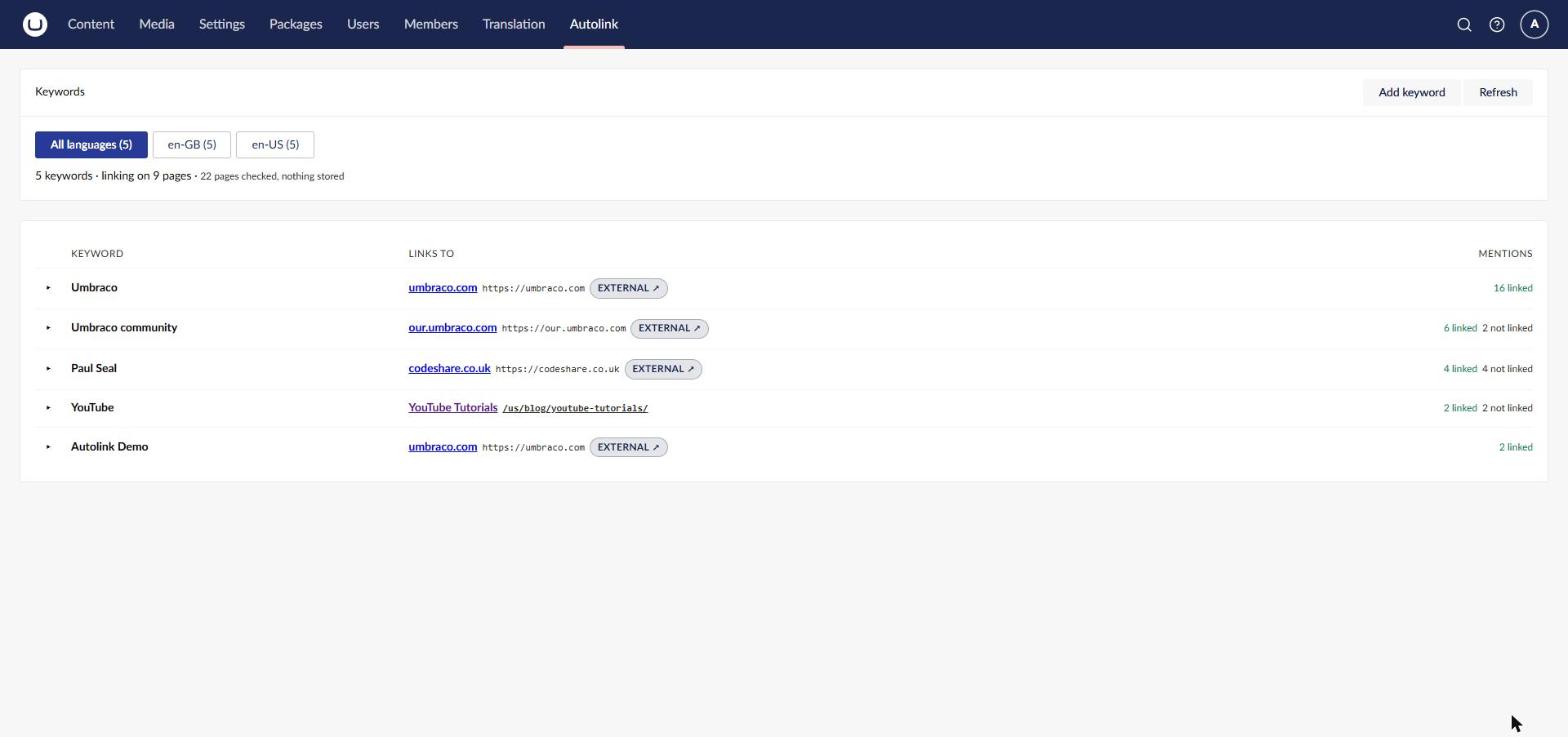
The summary line at the top is the whole design in one sentence: five keywords, linking on nine pages, twenty two pages checked, nothing stored.
It didn't start that way. In the first version you tagged the page itself: tag the Umbraco Automate page with Umbraco Automate and the linker picked it up. That felt natural, because the keyword lives with the page it describes.
But a tag can only say one thing: this page answers to this exact phrase. Nowhere to put a plural or a synonym without tagging the page again for every variation. Can't point at a page whose tags you don't control. Can't point at an external site at all, because there's no page to tag. All of that needed the package to keep its own record of "this phrase goes here".
Once those records existed, the tags were a second copy of the same information, and two copies can disagree. Rather than write rules for that argument, I deleted the tags and kept the records.
The destination control is Umbraco's own Multi URL Picker capped at one item, so internal and external destinations are the same action in the same familiar control. Keywords are per culture, because a bilingual site wants different phrases per language and each language resolves its own URLs.
My favourite consequence of that single table: a keyword can only exist once per culture, enforced by a unique index. Two pages fighting over the same phrase with the code silently picking a winner simply cannot happen. The database won't accept the second row.
The safety nets
Render time linking has a flip side. Deleting a page doesn't leave broken links behind, but every link pointing at it silently stops appearing and nobody gets told.
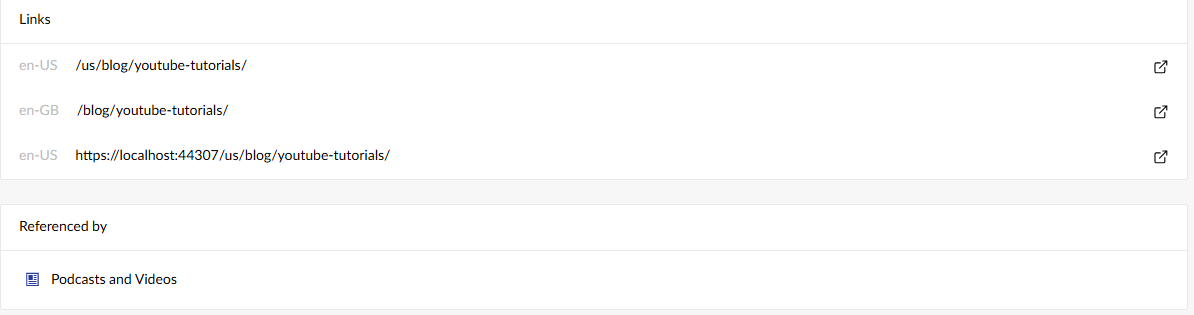
I didn't build a warning screen, because Umbraco already has one. The package writes relations between mentioning pages and their targets, flagged as dependencies. Umbraco's own delete dialog then says "the following items depend on this" and lists them, and the Info tab grows a "Referenced by" panel. No screen of mine anywhere, and it turns up where editors already look.
There's also an audit. Nothing is stored, so "which pages have autolinks on them" isn't written down anywhere. The package answers it by running the real linker over published content as a dry run and reporting what it would do. Because it's the same code the renderer uses, it can never offer to switch off a link that was never there.
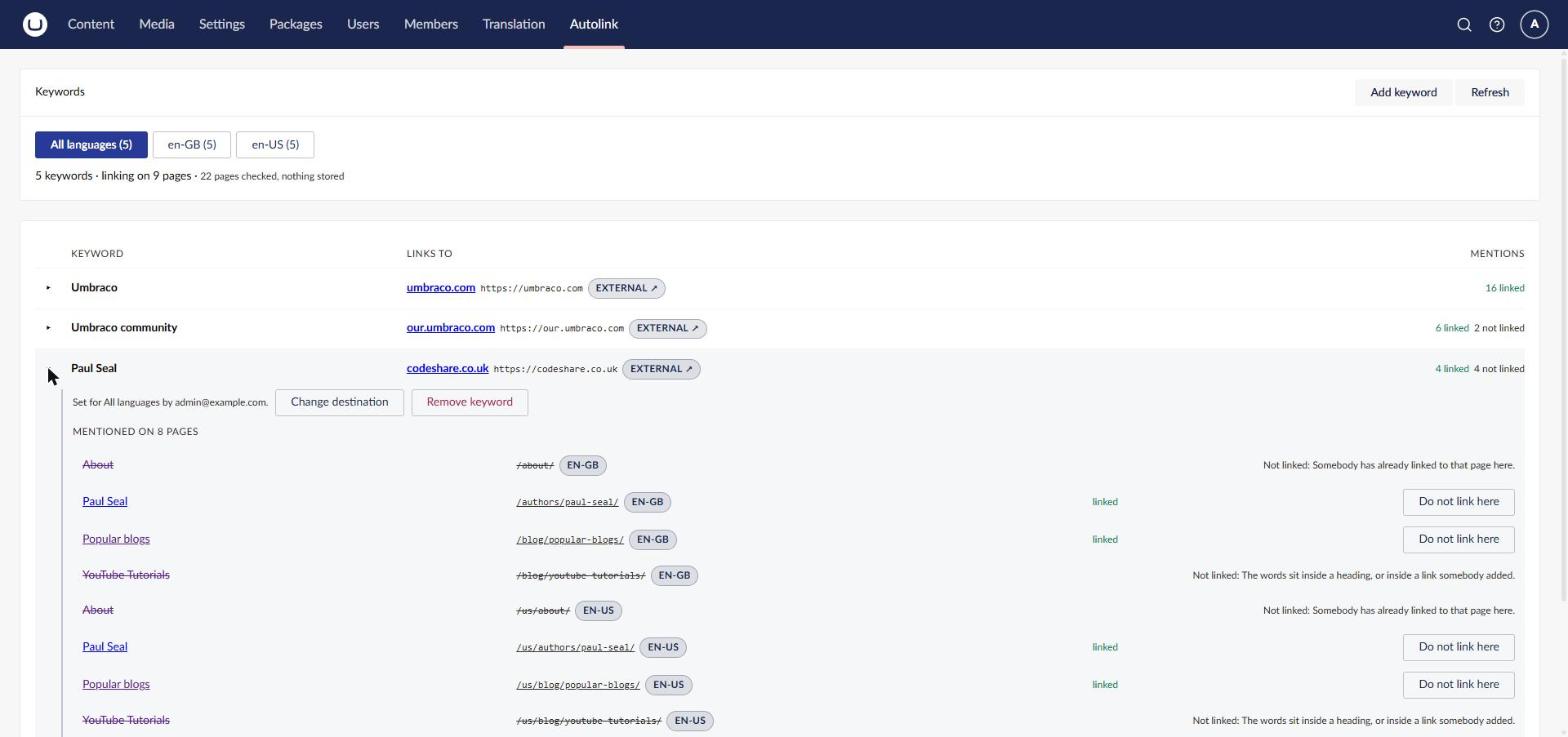
Expand a keyword and you get every page that mentions it, per culture, with a "Do not link here" button on the ones that are linked and a plain English reason on the ones that aren't. Somebody has already linked to that page here. The words sit inside a heading. Suppressions work per page or site wide, and there's an "Exclude from auto-linking" toggle on the document itself if you want a page left out of the scan entirely.
Is it fast enough
Fair question, given it parses HTML on every page view.
Keywords never touch the database at request time. The lookup is "here's a phrase, which destination owns it", and there might be a few hundred of those on a busy site. That's not a search, it's a dictionary, so it lives in memory as one, alongside a single compiled regular expression built from every keyword, sorted longest first. It rebuilds when the keywords change and otherwise just sits there.
People assume this is a job for Examine. I did too, at first. It isn't. Asking a search index a dictionary question on every paragraph of every request is a lot of moving parts around something a Dictionary answers instantly.
There is a real cost though, and it's worth being straight about. While the package is enabled, the wrapper returns PropertyCacheLevel.None instead of the inner converter's default. It has to. The output depends on the whole keyword set, not just that one property, so a cached property value would carry on serving old markup after somebody changed a keyword on a completely unrelated page. Opting out of that cache is what makes the backwards in time trick actually true.
So I measured it. A page with eight rich text blocks: 6.57 milliseconds per request with the feature off, 7.69 with it on. About a millisecond.
I'd very nearly built a caching layer before checking. Glad I checked, because it would have bought me complexity and a whole new species of stale page bug in exchange for one millisecond.
Measure first. Every time I skip that step, the thing I was worried about turns out to be fine and the real problem is somewhere I hadn't looked.
Installing it
dotnet add package Initials.AutoLink
Three steps:
- Grant the Autolink section to your user group.
- Add a keyword in Autolink, Keywords, and pick a destination with the Multi URL Picker.
- Reload a page that mentions it.
That's the whole setup. Nothing needs configuring, but if you want to tune it:
{
  "Initials": {
    "AutoLink": {
      "Enabled": true,
      "ExternalLinkRel": "nofollow",
      "MaxLinksPerKeyword": 1,
      "MaxLinksPerPage": 25
    }
  }
}
Enabled is a global off switch, handy for staging or for seeing what a page looks like without it. MaxLinksPerPage is the seatbelt, stopping a page that mentions forty keywords from turning into a wall of links.
Go and have a play
The package is on GitHub, and Marketplace and the repo includes a Clean starter kit site you can run to see it working rather than taking my word for it. There's a video walkthrough too.
Install it, grant yourself the section, add one keyword, and watch an article you wrote months ago quietly grow a link.
This is the first thing Initials Labs has put out as open source, and I'd love it if it wasn't the last. The Umbraco community has given me an absurd amount over the years: answers on Discord at 10pm, packages I lean on daily, people who'll look at your broken code because you asked nicely. So if you install it, tell us. If it breaks, definitely tell us, ideally as an issue on GitHub. And if you've got an idea for the next feature, that's how this one got most of its good bits.